> For the complete documentation index, see [llms.txt](https://manual.minimal.audio/llms.txt). Markdown versions of documentation pages are available by appending `.md` to page URLs; this page is available as [Markdown](https://manual.minimal.audio/core-effects-manual/effects/poly-flanger.md).
# Poly Flanger
***
### Overview
Poly Flanger is a musically-intelligent flanger designed to build movement that is in key with your track instead of only producing generic sweeps. Traditional flangers produce sounds that often feel disconnected from a track's tonal progression. Poly Flanger solves this by snapping its resonances to musical pitches, so the effect builds on your harmony rather than working against it.
At its core, Poly Flanger is a polyphonic comb filter with up to 8 modulatable voices. Each voice can be snapped to a specific pitch in a scale, creating harmonic resonances that range from subtle enhancement to full chord-like textures. Scale mode steps through notes in time with your track, and flexible LFO modulation can be quantized to rhythm and scale—so even randomized movement stays musically in tune.
For the preset bar, Settings menu and Global Tune, see [Preset Bar and Settings](/core-effects-manual/effects/preset-bar-and-settings.md).
***
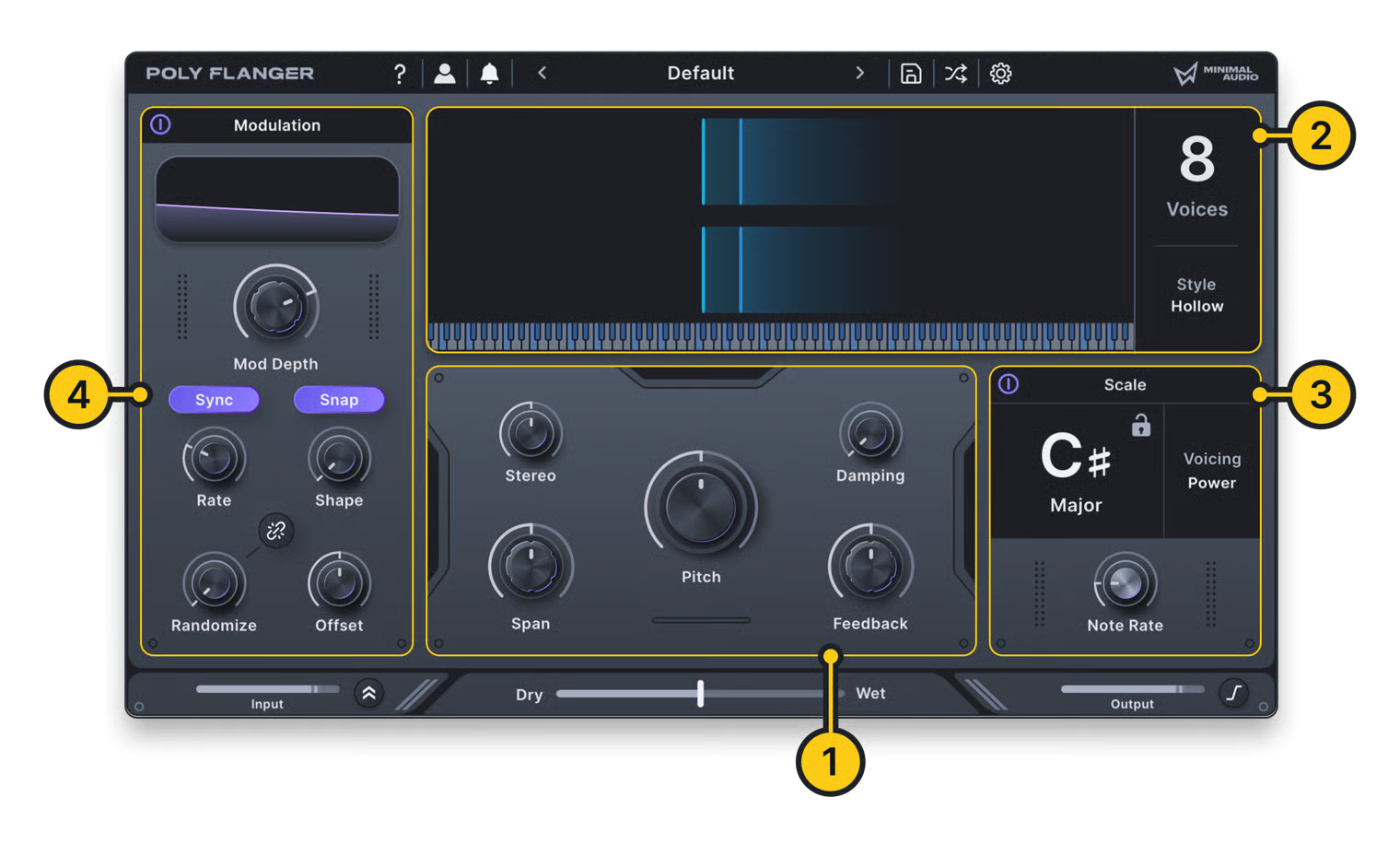
### 1. Main Controls
**Frequency.** Set the base pitch of the flanger's resonance. Lower values produce a deeper tone with wider harmonic spacing. Higher values produce a brighter, more tightly spaced resonance. **Frequency** and **Frequency Tune** are shown only while **Scale Mode** is off.
**Frequency Tune.** Toggle between Hz and MIDI note modes for the Frequency control.
**Global Tune.** Scale Mode pitches and **Pitch** follow the **Global Tune** setting. **Frequency** follows it only while **Frequency Tune** is on. See [Preset Bar and Settings](/core-effects-manual/effects/preset-bar-and-settings.md).
**Pitch.** Shift the pitch of the flanger up or down based on the currently selected scale. With Chromatic scale selected, this is in semitones; otherwise, it will step through scale degrees in the current scale.
**Span.** Spread each voice's pitch across musical intervals to create more complex resonances and chords. At 0%, all voices share the same pitch. Increasing the value gradually stacks voices into fourths, fifths, and octaves. Negative values invert the interval order.
**Stereo.** Control the stereo width of the flanger voices. At 0%, voices are centered. Increasing the value pans voices across the stereo field and adds subtle detuning between left and right for a wider image. Positive and negative values swap the left and right placement. Disabled when the plugin's output is mono.
**Damping.** Roll off high frequencies in the flanger's resonance. Higher values filter out harmonics for a warmer, darker tone. The filter partially tracks each voice's pitch, keeping the tonal character more consistent across the frequency range.
**Feedback.** Control how strongly the flanger resonates, creating harmonic peaks in the sound. Higher values create more pronounced, ringing tones that emphasize the harmonic character of the current style and can be pushed into resonator territory at extreme settings.
***
### 2. Display Controls
**Voices.** Set the number of flanger voices. More voices add harmonic density and enable richer chord stacking.
**Style.** Choose the character of the flanger effect.\
• **Classic:** Traditional flanger with both even and odd harmonics.\
• **Hollow:** Inverted flanger with odd harmonics and saturation.\
• **Vapor:** A unique diffused flanger with smeared resonances.
***
### 3. Scale Controls
**Scale Mode.** Quantize the flanger's pitch to notes in the current scale. Voices lock to musical pitches, creating arpeggiated harmonic movement and chord-like effects.
**Root Note.** Set the scale's root note.
**Scale Type.** Choose the musical scale used for pitch quantization. All quantized pitches and voicing\
intervals are derived from the selected scale.\
**Voicing.** Limit which notes the flanger voices can play.\
• **Off:** All notes in the current scale are available.\
• **Intervals:** Single notes or two-note intervals.\
• **Triads:** Three-note chords.\
• **Extended:** Four-note chords (7ths, 6ths, add9).\
• **Penta:** Pentatonic scale notes only.
**Note Rate.** Set the speed at which voices will change pitch in Scale mode, synced to your project's tempo. Faster rates create rapid arpeggios, while slower rates produce evolving harmonic progressions. At zero, voices snap instantly to new pitches. At other rates, voices crossfade smoothly between notes.
**Scale Lock.** Lock the scale settings between presets. When enabled, the root note and scale type will persist when loading new presets.
***
### 4. Modulation
**Modulation Depth.** Adjust the depth of the internal modulation applied to Frequency and Pitch\
controls. Setting this to 0% will enable manual control with no modulation.
**Rate.** Adjust the LFO rate.
**Rate Sync.** Enable BPM sync for the LFO rate.
**Shape Snap.** Enable snapping between LFO shapes. When disabled, the LFO shapes are continuously morphed.
**LFO Shape.** Choose from sine, triangle, downward ramp, or square LFO shapes. With Snap off, these shapes can be continuously morphed.
**LFO Randomize.** Adjust the amount of LFO randomization. Note that each waveform randomizes in a unique way.
**Stereo Randomize.** When active, separate randomization will be applied to each of the LFO's stereo channels, resulting in a wider effect. Disabled when the plugin's output is mono.
**Stereo Offset.** Set the phase offset between the stereo outputs of the LFO. Disabled when the plugin's output is mono.
---
# Agent Instructions
This documentation is published with GitBook. GitBook is the documentation platform designed so that both humans and AI agents can read, navigate, and reason over technical content effectively. Learn more at gitbook.com.
## Querying This Documentation
If you need additional information that is not directly available in this page, you can query the documentation by asking a question.
Perform an HTTP GET request on the following URL with the `ask` and `goal` query parameters:
```
GET https://manual.minimal.audio/core-effects-manual/effects/poly-flanger.md?ask=&goal=
```
`ask` is the immediate question: it should be specific, self-contained, and written in natural language.
`goal` is what the user is ultimately trying to achieve, the reason they need the answer. Sharing it helps GitBook give you a better, more relevant answer. A goal is most helpful when it describes the outcome the user wants rather than restating the question. For example, with `ask=how do I create an API token`, a goal like `automate deployments from our CI pipeline` lets GitBook tailor the answer to that use case.
The response will contain a direct answer to the question and relevant excerpts and sources from the documentation.
Use this mechanism when the answer is not explicitly present in the current page, you need clarification or additional context, or you want to retrieve related documentation sections.