> For the complete documentation index, see [llms.txt](https://manual.minimal.audio/llms.txt). Markdown versions of documentation pages are available by appending `.md` to page URLs; this page is available as [Markdown](https://manual.minimal.audio/current-manual/modulation/curve-sequencer.md).
# Curve Sequencer
***
### Overview
The curve sequencer allows you to create custom modulation shapes using a variety of draw tools and precise editing features. It's versatile enough for both sequencing and LFO tasks. Use different shape tools to create rhythmic patterns, generate random shapes and save them as sub-presets, and more.
***
### 1. Curve Presets
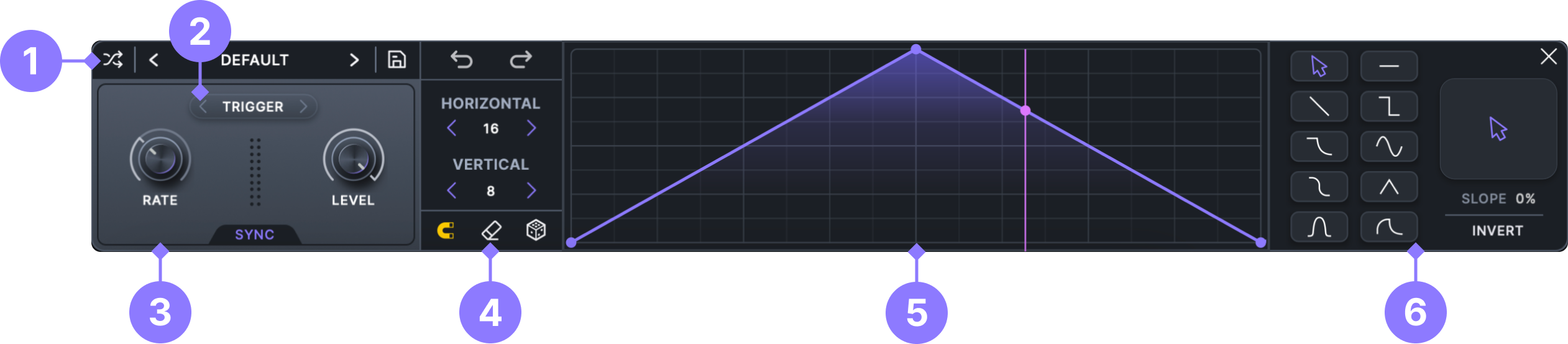
The Curve modulator includes sub-presets that can be saved and loaded from the top bar of the preset area, allowing you to easily reuse your favorite modulation shapes.
***
### 2. Trigger Modes
Choose how the Curve responds to incoming MIDI notes:
* **Timeline.** Locks the Curve to your DAW's timeline, keeping playback synchronized with the project position and tempo.
* **Trigger.** Resets on incoming MIDI, then loops continuously.
* **One-Shot.** Resets on incoming MIDI and plays through once per note.
* **Scrub.** disables playback rate and lets you scan through the held Curve using the **Phase** control. This is useful for driving the Curve with another modulator or for remapping modulation behavior.
### 3. Curve Controls
**Rate.** Adjust the Curve modulator’s rate in Hz or BPM-synced values.
**Sync.** Enable or disable BPM synchronization for **Rate**.
**Phase.** Sets the phase offset of the Curve, determining where the modulation cycle begins. In **Timeline** mode, it offsets the phase relative to the DAW's timeline position.
**Snap.** When active, the **Phase** offset snaps to the Curve's horizontal grid divisions.
**Level.** Attenuate or invert the modulator’s output. This affects every assignment that uses the Curve.
***
### 4. Curve Editor Settings
**Undo.** Undo previous changes to the **Curve** editor.
**Redo.** Redo previous changes to the **Curve** editor.
**Horizontal Grid Division.** Choose how the Curve Editor is rhythmically divided:
* **Standard.** Grid divisions divisible by two.
* **Triplet.** Grid divisions that fit onto a triplet grid.
* **Odd.** Grid divisions that do not fit on a standard or triplet grid.
**Vertical Grid Division.** Choose how the **Curve Editor's** modulation level is divided. This can be useful for snapping the **Curve** to precise values needed for tasks such as pitch modulation.
**Clear Curve.** Reset the current **Curve** shape.
**Snap to Grid.** When active, all edits will snap to the horizontal and vertical grid.
**Randomize Curve.** Generate different types of modulation shapes.
Try changing the Curve's grid sizes to adjust how the shapes are generated.
Right-click on the randomize button to select a specific randomization type.
* **Random Shape.** Randomly generate any of the following types.
* **Smooth.** Shapes similar to sine waves.
* **Linear.** Shapes similar to triangle waves.
* **Chaos.** Complex shapes that are not always on the grid.
* **Steps.** Step sequencer patterns.
* **Segments.** A combination of steps and linear ramps.
* **Gates.** Sequences for turning signals on and off.
* **Ramp Down.** Stab and downward sweeping shapes.
* **Ramp Up.** Pumping and upward sweeping shapes.
***
### 5. Curve Editor
Use the Curve Editor to create custom modulation shapes.
When the mouse tool is selected, the following key commands are available:
* **Move Off Grid.** Hold down **Shift** while dragging on a point.
* **Straighten Curve.** **Shift-click** on a line or selection.
* **Move Segment.** **Command-click** (macOS) or **Ctrl-click** (Windows) and drag on a line.
* **Delete Point.** **Double-click** on an existing point.
**Selecting points.** With the mouse tool, drag across the editor to select the points inside the selection box. Shift-click a point to add it to the selection, or Command-click (macOS) / Ctrl-click (Windows) to toggle it. Drag any selected point to move the whole selection, press Delete or Backspace to remove it, and click an empty area to clear it. The first and last points of the Curve can't be selected.
***
### 6. Draw Tools
On the right side of the Curve Editor, you'll find the draw tool buttons. The mouse tool allows for manual drawing and editing of shapes, while the other tools create shapes based on the current grid division settings.
**Slope.** Adjust the shape of the currently selected draw tool.
**Invert.** When active, the shape tools will be inverted, providing even more options.
---
# Agent Instructions
This documentation is published with GitBook. GitBook is the documentation platform designed so that both humans and AI agents can read, navigate, and reason over technical content effectively. Learn more at gitbook.com.
## Querying This Documentation
If you need additional information that is not directly available in this page, you can query the documentation by asking a question.
Perform an HTTP GET request on the following URL with the `ask` and `goal` query parameters:
```
GET https://manual.minimal.audio/current-manual/modulation/curve-sequencer.md?ask=&goal=
```
`ask` is the immediate question: it should be specific, self-contained, and written in natural language.
`goal` is what the user is ultimately trying to achieve, the reason they need the answer. Sharing it helps GitBook give you a better, more relevant answer. A goal is most helpful when it describes the outcome the user wants rather than restating the question. For example, with `ask=how do I create an API token`, a goal like `automate deployments from our CI pipeline` lets GitBook tailor the answer to that use case.
The response will contain a direct answer to the question and relevant excerpts and sources from the documentation.
Use this mechanism when the answer is not explicitly present in the current page, you need clarification or additional context, or you want to retrieve related documentation sections.